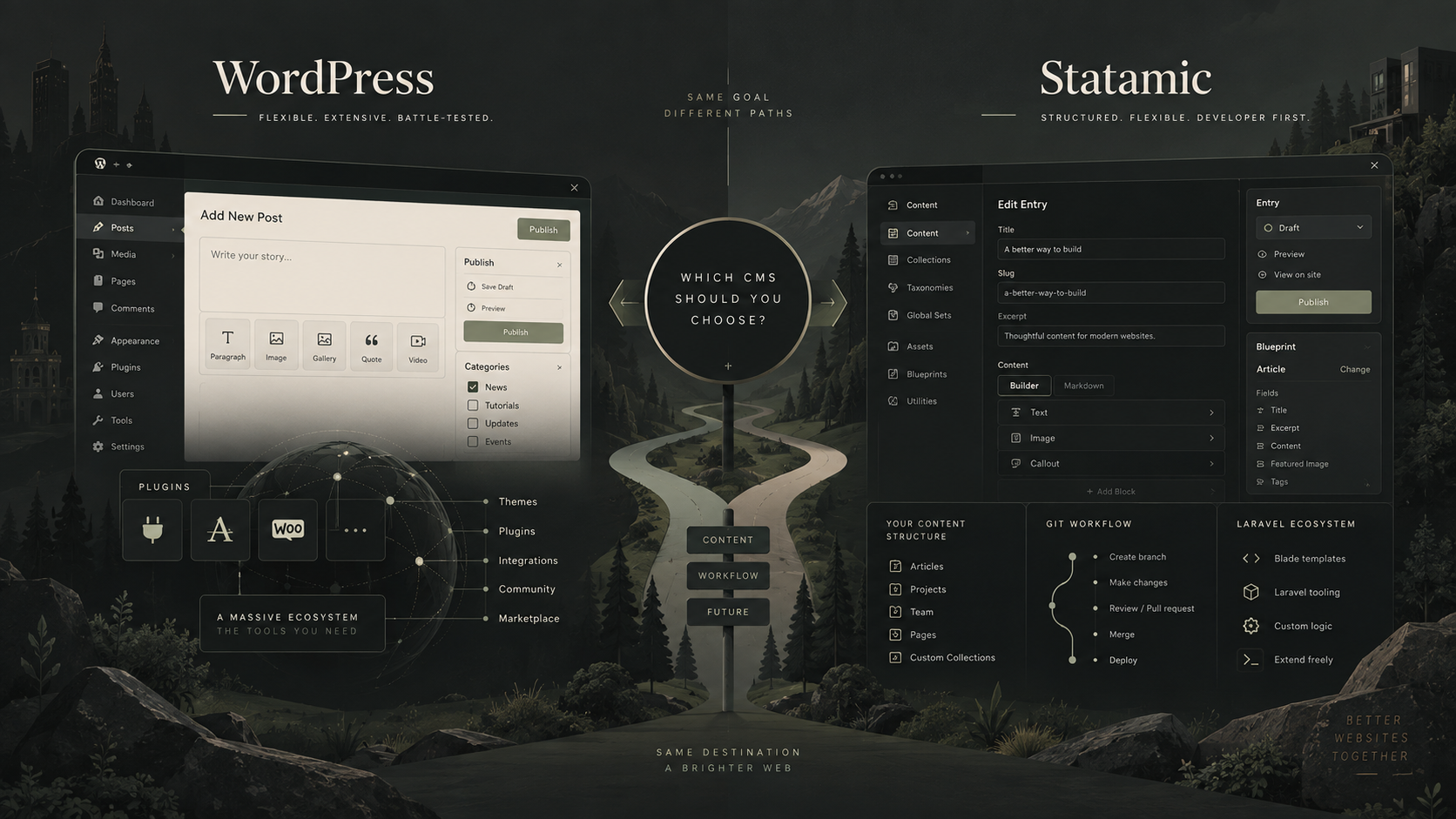
WordPress and Statamic can both be used to build excellent websites, but they approach content management in quite different ways.
WordPress is the obvious name most businesses already know. It has an enormous ecosystem, a familiar editing experience and can be extended to handle almost anything.
Statamic is built on Laravel and takes a more developer-focused approach. It gives developers a lot of control over how content is structured and how a site is built, while still providing clients with a polished control panel for managing that content.
I’ve worked with both, and I don’t think there’s a universal winner.
For me, the decision usually comes down to the type of website being built, who will maintain it, what functionality it needs and how important the development workflow is likely to become over the lifetime of the project.
The short version
If you just want the condensed answer:
I’d usually choose WordPress when:
- the website is primarily a marketing or content website
- the client is already comfortable with WordPress
- WooCommerce or another established WordPress integration is important
- there is value in having a very large pool of developers available
- existing plugins can solve significant parts of the requirement well
I’d seriously consider Statamic when:
- the site is highly bespoke
- content needs to be carefully structured
- the project already sits naturally within the Laravel ecosystem
- the development team values Git-based workflows
- I’m building something where WordPress would require a collection of plugins and workarounds to achieve the same result
There are plenty of exceptions to both lists.
The interesting part is why.
WordPress: the established all-rounder
WordPress has been around for a long time, and that brings some very real advantages.
The biggest is its ecosystem.
There are plugins and integrations available for almost every common website requirement: forms, ecommerce, search, SEO tooling, membership systems, multilingual content, CRM integrations and countless other things.
That doesn’t mean installing a plugin is automatically the right answer to every problem.
But if a mature, well-supported solution already exists, it can make very little sense to rebuild that functionality from scratch.
For many business websites, that’s a significant advantage.
Clients already understand it
Another benefit is familiarity.
A lot of marketing teams and content editors have used WordPress before.
Even when the website itself is completely bespoke, the underlying concepts — pages, posts, media, drafts and publishing — are usually familiar.
That reduces training and makes it easier for somebody joining the business later to understand how the website works.
There’s also a practical business advantage: you’re unlikely to struggle to find another WordPress developer if you need one.
I think that’s sometimes overlooked when choosing technology.
The website needs to remain maintainable long after the initial project has finished.
WordPress doesn’t have to mean an off-the-shelf theme
One misconception worth clearing up is that choosing WordPress means choosing a pre-built theme or a drag-and-drop page builder.
It doesn’t.
Most of the WordPress sites I build are bespoke.
The design can be completely custom while WordPress simply handles the content-management side behind it.
Custom post types, taxonomies and structured fields can give editors a much more controlled experience than a completely free-form page builder.
That distinction matters.
Some of the problems associated with WordPress aren’t really problems with WordPress itself. They’re the result of websites that have accumulated too many plugins, too much theme functionality or too many layers of page-builder abstraction over time.
A well-built WordPress site can be extremely straightforward to maintain.
Read more about my WordPress development work
Where WordPress can become awkward
The flexibility of WordPress is also one of the reasons sites can become complicated.
Because it’s so easy to extend, there’s always another plugin available.
A requirement starts with WordPress core. Then a plugin handles forms. Another handles custom fields. Another handles redirects. Another adds ecommerce. Another integrates the CRM. A page builder controls the layouts.
None of those decisions is necessarily bad.
The problem comes when the combination becomes the architecture.
I’ve taken over WordPress sites where nobody is quite sure which plugin is responsible for which piece of functionality, updates are treated with suspicion and a relatively small change requires understanding several overlapping systems.
That isn’t inevitable, but it is something worth managing carefully.
For a project that requires a lot of genuinely bespoke application-style behaviour, there can also be a point where forcing everything through WordPress stops being the most sensible option.
That’s where Statamic can become particularly interesting.
Statamic: a CMS built around Laravel
Statamic is built on Laravel, which immediately makes it feel quite different from WordPress from a developer’s perspective.
Laravel provides the underlying application framework and Statamic provides the content-management layer.
That means if a project needs custom application logic, APIs, integrations or other functionality beyond straightforward content management, you’re already working within a framework designed for building those things.
For developers already comfortable with Laravel, that’s a very attractive combination.
Rather than adapting the CMS around the application, the CMS can become part of the application.
Statamic’s content model is one of its strongest features
One of the things I particularly like about Statamic is the way content can be modelled.
Instead of thinking mainly in terms of pages and posts, you define the structure the website actually needs.
An estate agent might have properties.
A university might have courses.
A business might have locations, team members, services and case studies.
Each content type can have exactly the fields editors need.
WordPress can absolutely achieve structured content as well — I build WordPress sites this way regularly — but in Statamic it feels particularly fundamental to the way the system is designed.
For bespoke websites with unusual content structures, that can make for a very clean implementation.
What does “flat-file CMS” actually mean?
Statamic is often described as a flat-file CMS.
By default, content can be stored in files rather than every piece of content living in a traditional database.
That has an interesting advantage for developers: the content itself can form part of the Git repository alongside the code.
A content change can therefore be versioned in much the same way as a code change.
Developers can create branches, see exactly what has changed and roll changes backwards if necessary.
That’s a very different workflow from a traditional WordPress installation, where code generally lives in Git while much of the site’s content and configuration lives separately in the database.
But it’s worth adding an important qualification.
Statamic isn’t limited to flat files.
For projects where it makes more sense, content can also be moved into database-backed storage.
So I wouldn’t choose Statamic simply because somebody told me that “flat files are faster” or that databases are somehow bad.
The interesting part is having the option to choose the approach that suits the project.
The editing experience
Both platforms can provide a very good editing experience.
WordPress has a mature editor and a huge range of tools around content creation.
Statamic’s control panel feels more deliberately shaped around the content model created for the particular website.
Neither is automatically better for an editor.
What matters more is how the developer has configured it.
I don’t generally want clients editing arbitrary templates or worrying about how the website is constructed.
I want them editing things they understand:
- a heading
- an introduction
- an image
- a team member
- a testimonial
- a service
- a case study
and letting the templates decide how those things should appear.
You can build that experience in either platform.
What about performance?
I wouldn’t choose between WordPress and Statamic based purely on claims that one is “faster”.
Both can produce very fast websites.
Both can also be implemented badly.
Performance depends on considerably more than the CMS: templates, images, fonts, third-party scripts, caching, hosting and the amount of work required to generate a page all matter.
Statamic’s architecture can lend itself very nicely to highly performant builds and static caching.
WordPress can also perform extremely well when it’s built properly and appropriately cached.
I’d therefore treat performance as an implementation requirement rather than a reason on its own to select a CMS.
What about SEO?
The same applies to SEO.
Neither CMS magically ranks better.
Both give developers the ability to produce the things that actually matter technically: sensible URLs, metadata, canonical tags, structured data, XML sitemaps, redirects, performant pages and clean semantic HTML.
WordPress has the advantage of a very mature SEO plugin ecosystem.
Statamic has its own SEO tooling and gives developers plenty of control over how the underlying site is produced.
The CMS is rarely the limiting factor.
A technically excellent website with poor content isn’t going to succeed simply because it was built using one CMS rather than another.
Plugins versus bespoke development
This is probably one of the biggest practical differences between the two platforms.
With WordPress, my first question when a client needs common functionality is often:
Is there already a good, well-supported solution for this?
There frequently is.
That can save a lot of development time and money.
Statamic has add-ons too, but its ecosystem is much smaller.
The flip side is that because Statamic sits on Laravel, custom functionality can be developed using the Laravel ecosystem and conventional application-development patterns.
So the trade-off is roughly this:
WordPress has an enormous ready-made ecosystem.
Statamic gives a Laravel developer a very natural foundation for bespoke functionality.
Which advantage matters more depends entirely on the project.
Ecommerce is an area where WordPress has a major advantage
If the project revolves around ecommerce, WordPress deserves particularly serious consideration because of WooCommerce and the ecosystem around it.
Payments, shipping, subscriptions, tax systems, stock management and integrations with other business systems often already have established solutions available.
That doesn’t mean every online shop should use WooCommerce.
But recreating mature ecommerce functionality is expensive, and there needs to be a good reason for doing it.
If a client came to me wanting a relatively conventional online shop, WordPress and WooCommerce would generally be fairly high on the list of options I’d consider.
Developer workflow is where Statamic becomes particularly attractive
This is where I think the difference becomes much more noticeable.
If I’m working on a bespoke project with other developers, using Git extensively, deploying through different environments and building custom Laravel functionality, Statamic fits very naturally into that workflow.
Code, configuration and — when using flat-file content — potentially the content itself can all be treated as part of the project.
That’s especially appealing on projects where development will continue for years rather than ending when the initial website launches.
WordPress can absolutely be run with professional Git and deployment workflows too.
I do it.
It just has a different relationship with the database and application state, so deployments need to take that into account.
What about cost?
WordPress itself is open-source software and doesn’t have a licence fee.
You may still pay for premium plugins, commercial themes, hosting and development, of course.
Statamic has a free Core edition, while many commercial client projects will need the paid Pro edition for features such as multiple users, roles, revisions and some of its more advanced functionality.
That makes software licensing part of the decision.
In the context of a bespoke website, though, I wouldn’t make a CMS decision based on the licence fee alone.
The larger cost over the lifetime of most substantial websites is development and maintenance.
A system that takes considerably less time to develop and maintain can easily justify a licence cost.
Equally, there’s no reason to add a commercial CMS licence if WordPress already solves the problem extremely well.
Availability of developers matters
This is an area where WordPress has a clear advantage.
There are a lot of WordPress developers.
If the original developer disappears or your requirements change, finding somebody else capable of working on the website shouldn’t be particularly difficult.
Statamic has a smaller developer community.
Its Laravel foundations help — a good Laravel developer has a very useful starting point — but Statamic experience isn’t nearly as widespread as WordPress experience.
That’s not necessarily a reason not to use it.
But it is something I’d factor into the decision, particularly for businesses that expect several different suppliers or internal developers to work on the site over its lifetime.
Technology choices should take into account who is going to look after the project in five years, not just who is building it today.
When would I choose WordPress?
For most conventional business and marketing websites, WordPress remains very difficult to beat.
I’d lean towards it when:
- the site is primarily marketing and editorial content
- the client already knows WordPress
- ecommerce is an important part of the project
- there are established plugins that solve important requirements well
- being able to find future developers easily is a priority
- the website doesn’t require substantial bespoke application logic
That covers a very large number of websites.
There’s a reason I still build a lot of projects with it.
When would I choose Statamic?
I’d be particularly interested in Statamic when:
- the website is highly bespoke
- the content model is more complex than a typical marketing site
- the project needs substantial custom Laravel functionality
- the development workflow is particularly important
- the site will be actively developed over a long period
- versioning content alongside code is valuable
- using WordPress would require bending several plugins into something they weren’t really designed to do
This is where Statamic starts to feel less like an alternative version of WordPress and more like a different approach to building a content-managed application.
What if you’re already using one of them?
I wouldn’t migrate from WordPress to Statamic — or from Statamic to WordPress — simply because somebody prefers the other platform.
Replatforming a functioning website is expensive.
If an existing WordPress site is meeting the business’s needs, the fact that a developer might prefer Statamic isn’t a good reason to rebuild it.
Likewise, a well-built Statamic site doesn’t need migrating to WordPress simply because WordPress is more widely used.
I’d look at the problems you’re actually trying to solve.
Is development becoming difficult?
Can editors manage the content they need?
Is important functionality being held together by workarounds?
Are there problems finding developers?
Has the business outgrown the original architecture?
Those are reasons to investigate a change.
Personal preference isn’t.
So, Statamic or WordPress?
For many websites, I’d still choose WordPress.
Its ecosystem, familiarity and flexibility make it an extremely practical CMS, and a well-built bespoke WordPress site can remain easy to maintain for many years.
But there are projects where Statamic is a better fit.
If I’m building something highly bespoke, particularly where Laravel is already part of the picture, Statamic gives me a very clean way to combine structured content management with a modern application framework and a strong development workflow.
That’s really the distinction I’d make.
WordPress is an excellent general-purpose CMS with an enormous ecosystem.
Statamic is particularly compelling when the website is a bespoke development project and Laravel is an advantage rather than an implementation detail.
The right question isn’t which CMS is better.
It’s which one makes the most sense for the website you’re actually building.
If you’re planning a new website and aren’t sure which direction to take, get in touch. I can help work through the technical requirements before you commit to a platform.
If WordPress is already the right fit, you can also read more about my WordPress development services.