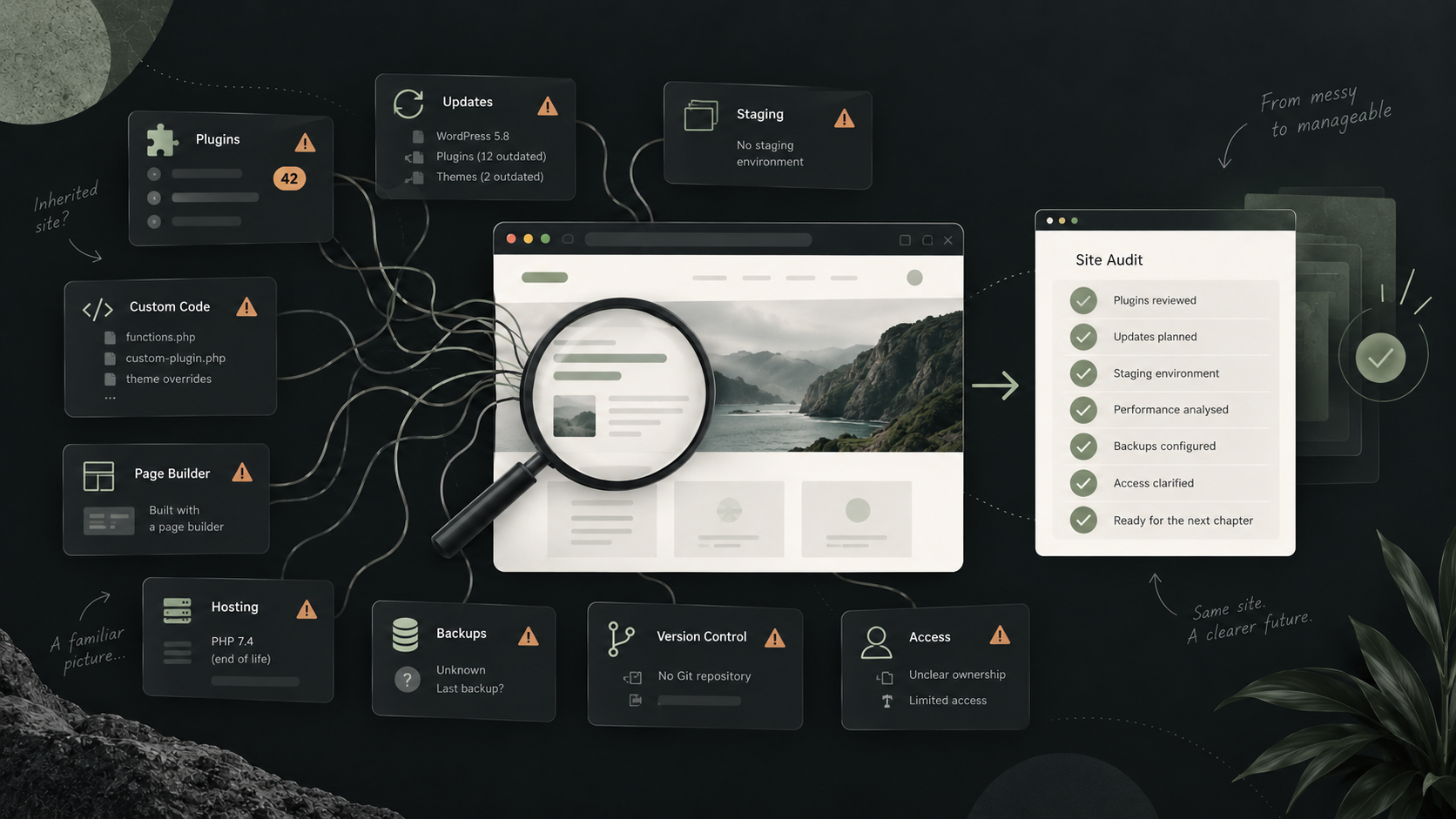
Taking over an existing WordPress website is very different from building one from scratch.
With a new build, you get to decide how everything fits together. With an inherited site, you’re working with decisions made by other developers, agencies and site owners over several years — often with very little documentation explaining why.
Some sites are in great shape.
Others have accumulated layers of plugins, workarounds and abandoned code until relatively simple changes have become surprisingly difficult.
Before I start making significant changes to an existing WordPress site, I like to understand exactly what I’m dealing with. These are some of the problems I look for first.
1. Plugins that have accumulated over the years
A large plugin list isn’t automatically a bad thing.
Twenty well-maintained plugins that each have a clear purpose can be far less problematic than five badly written ones.
The problem is when nobody really knows why half of them are installed.
It’s common to find plugins that were added to solve a temporary problem years ago, plugins whose functionality has since been replaced, several plugins doing almost the same thing, or inactive plugins that have simply been left behind.
That makes the site harder to understand and introduces more dependencies to maintain.
When I take over a site, I want to know what each plugin does, whether it’s still required, whether it’s actively maintained and what would happen if it disappeared.
The aim isn’t to reach some arbitrary minimum number of plugins. It’s to make sure every dependency has a reason to be there.
2. Updates have become something everybody is afraid to install
One of the biggest warning signs is hearing:
“We don’t update that plugin because it breaks the website.”
WordPress core, plugins and themes all need updating over time. If routine updates have become dangerous, the underlying problem usually isn’t the update itself — it’s that the website has become fragile.
I’ve seen sites where updates have been avoided for months because nobody is confident about what they might break.
That tends to make the eventual update considerably more difficult.
A healthy setup should make updates relatively boring.
There should be a reliable backup, somewhere to test significant changes before they reach the live site, and a way of rolling back if something goes wrong.
If updating WordPress feels like pulling the pin from a grenade, that’s something worth fixing.
3. Nobody has a safe staging environment
Closely related to updates is the absence of a proper staging site.
If every change has to be made directly on the live website, even a small job carries unnecessary risk.
Plugin updates, PHP upgrades, new functionality and changes to existing templates should ideally be tested somewhere that isn’t serving real customers.
A staging environment doesn’t need to be complicated.
It just needs to provide somewhere representative of the live site where changes can be checked before they’re deployed.
For me, having a sensible development and staging workflow is one of the first things to establish when taking responsibility for an existing website.
It makes practically everything that follows safer.
4. Custom work has been added wherever it happened to fit
WordPress makes it very easy to change things.
Unfortunately, that also makes it easy for years of small fixes to end up scattered around the website.
I sometimes find custom PHP inside theme files, snippets added through admin plugins, JavaScript pasted into theme settings, CSS spread across multiple locations and functionality built into places where nobody would think to look for it.
Each individual change may have made sense at the time.
The problem appears a few years later when a developer needs to understand how the site works.
Before adding more code, I prefer to work out what is already custom, where it lives and whether it belongs there.
Sometimes it makes sense to leave existing code alone. Sometimes a small amount of refactoring can make future maintenance considerably easier.
The important thing is understanding the consequences before changing it.
5. The site is heavily locked into a page builder or theme
Page builders can be useful tools.
The problem comes when an entire website has become so dependent on a particular builder, theme or collection of shortcodes that changing anything outside its intended workflow becomes difficult.
I’ve inherited sites where relatively simple design or functionality changes require fighting against layers of generated markup and CSS.
Others rely heavily on a commercial theme that hasn’t been updated for years.
That doesn’t automatically mean the website needs rebuilding.
Often it doesn’t.
But it’s important to understand how much of the site depends on that platform and what the implications are for performance, future development and maintainability.
Sometimes working within the existing setup is perfectly reasonable.
Sometimes continuing to add more on top simply makes the eventual problem larger.
6. Hosting and PHP have been forgotten about
A website isn’t just WordPress.
The environment underneath it matters too.
When taking over an older site, I check things such as the PHP version, database version, SSL configuration, scheduled tasks, caching and how the hosting itself is managed.
It’s not unusual for a site to have stayed on the same hosting account for years while the application above it has continued changing.
Older PHP versions can eventually prevent plugins or WordPress itself from being updated safely. Poorly configured hosting can also make performance problems look like WordPress problems.
Moving host isn’t automatically the answer.
Quite often the existing setup is perfectly usable once it’s understood and tidied up.
But the server is part of the website, and it shouldn’t be ignored simply because nobody sees it.
7. Backups exist — but nobody knows whether they work
“Yes, it’s backed up” is something I always like to investigate a little further.
Where are the backups stored?
How frequently are they taken?
How many copies are retained?
Do they include both the database and uploaded files?
And, most importantly, has anyone ever tried restoring one?
A backup that has never been tested is still an unknown.
I’d also rather not have the only backup sitting on the same server as the website it’s supposed to protect.
Before carrying out significant work on an inherited site, I want to know there is a reliable route back if something goes badly wrong.
That makes development safer, but it also protects the business from problems unrelated to whatever I’m working on.
8. Performance has degraded a little at a time
Slow WordPress sites aren’t always caused by one enormous problem.
More often, they’ve become slower gradually.
A new plugin adds another stylesheet. A tracking script is added. Then a chat widget. Images get uploaded straight from a camera. A page builder adds more JavaScript. Another marketing tool gets installed.
None of those changes necessarily causes an obvious problem on its own.
After several years, though, the result can be a site downloading far more than it needs to.
When looking at performance, I prefer to find out what is actually causing the slowdown rather than immediately installing another optimisation plugin.
That could mean looking at images, fonts, scripts, database queries, third-party services, caching or the hosting environment itself.
Performance problems are much easier to solve once you know where the time is actually being spent.
9. There is no version control or clear deployment process
For custom WordPress development, I like code to live in version control.
That gives you a history of what changed, when it changed and — ideally — why.
It’s particularly useful when more than one developer has worked on a site.
Without it, an inherited website can become a snapshot of whatever happens to be sitting on the production server.
You’re then left trying to work out whether a file has been edited manually, whether the copy on somebody’s laptop is newer, and whether making a change might overwrite somebody else’s work.
Not every website needs an elaborate deployment pipeline.
But there should be a clear source of truth for custom code and a repeatable way of getting changes from development to production.
It makes future work considerably less risky.
10. Nobody really owns or understands the whole setup
This is probably the most important one.
Over time, responsibility for a website can become fragmented.
The domain might be registered in one account, hosting belongs to a previous agency, plugins are licensed through a developer who no longer works on the project, analytics belongs to an old employee and nobody knows who controls the DNS.
The same thing happens with knowledge.
One developer knew how a particular integration worked, but they left two years ago. Something important relies on a scheduled task that isn’t documented anywhere. A paid plugin is critical to the site, but nobody knows whose account purchased it.
Part of taking over a site is simply establishing what exists and who controls it.
I want the business or agency I’m working with to have access to the things it depends on.
The website shouldn’t only function because one particular developer knows where everything is hidden.
Does finding these problems mean the website needs rebuilding?
Usually, no.
That’s an important distinction.
An inherited WordPress site doesn’t need to be perfect before it’s worth maintaining.
Every established website carries some technical debt, and ripping everything out because it isn’t how I would have built it isn’t particularly useful.
The question is whether the existing setup is preventing the business from doing what it needs to do.
If a site is stable, reasonably secure and straightforward to work on, some untidy code may simply not matter very much.
If every update breaks something, development takes twice as long as it should and nobody is confident making changes, then addressing the underlying problems starts to become worthwhile.
Sometimes that means a rebuild.
More often, it means improving things gradually while continuing to use the website that’s already there.
What I check before taking over a WordPress site
Before starting significant development on an inherited project, I normally want to understand:
- the WordPress, PHP and database versions
- active and inactive plugins
- the theme and any custom theme code
- custom plugins and bespoke functionality
- hosting and DNS
- backups and how they can be restored
- staging and development environments
- Git repositories and deployment processes
- administrator accounts and access
- third-party integrations
- plugin and theme licences
- analytics and other external services
The point isn’t to create a huge technical report for every website.
It’s to avoid making changes before understanding what those changes might affect.
A little investigation at the beginning can save a lot of unpleasant surprises later.
Taking over an existing WordPress website?
A lot of my WordPress work isn’t building brand-new websites.
I also work with businesses and digital agencies that already have a WordPress site but need somebody to take responsibility for the development side of it.
That might mean fixing an immediate problem, adding new functionality, improving an ageing codebase or simply getting a site back into a state where people are comfortable working on it again.
I don’t assume an inherited site needs rebuilding just because I didn’t build it.
The first step is understanding what you’ve already got.
You can read more about my WordPress development services, or get in touch if you have an existing site you’d like me to take a look at.